 Miunit
 documentation / Daily work
Usage
Inspect local storage and the web and token activity Miunit was able to record.
Inspect local storage
Open Usage → Storage and expand the storage details for Miunit or an Agent. The view measures logical file sizes and lets you see which categories account for them. Use the coverage and measurement labels when comparing snapshots. Changes in scope or partial scans can leave gaps in a trend.
Storage is a read-only inventory. Deleting files is a separate action outside this view.
Explore an example Usage breakdown
Read reported web activity
Use Web Usage to inspect web and tool activity reported by supported Agents. Web events show domains. Use the MCP filter to see recorded MCP calls separately. Requests inside scripts, Agent servers, or downstream MCP services can be outside this view.
Compare recorded token usage
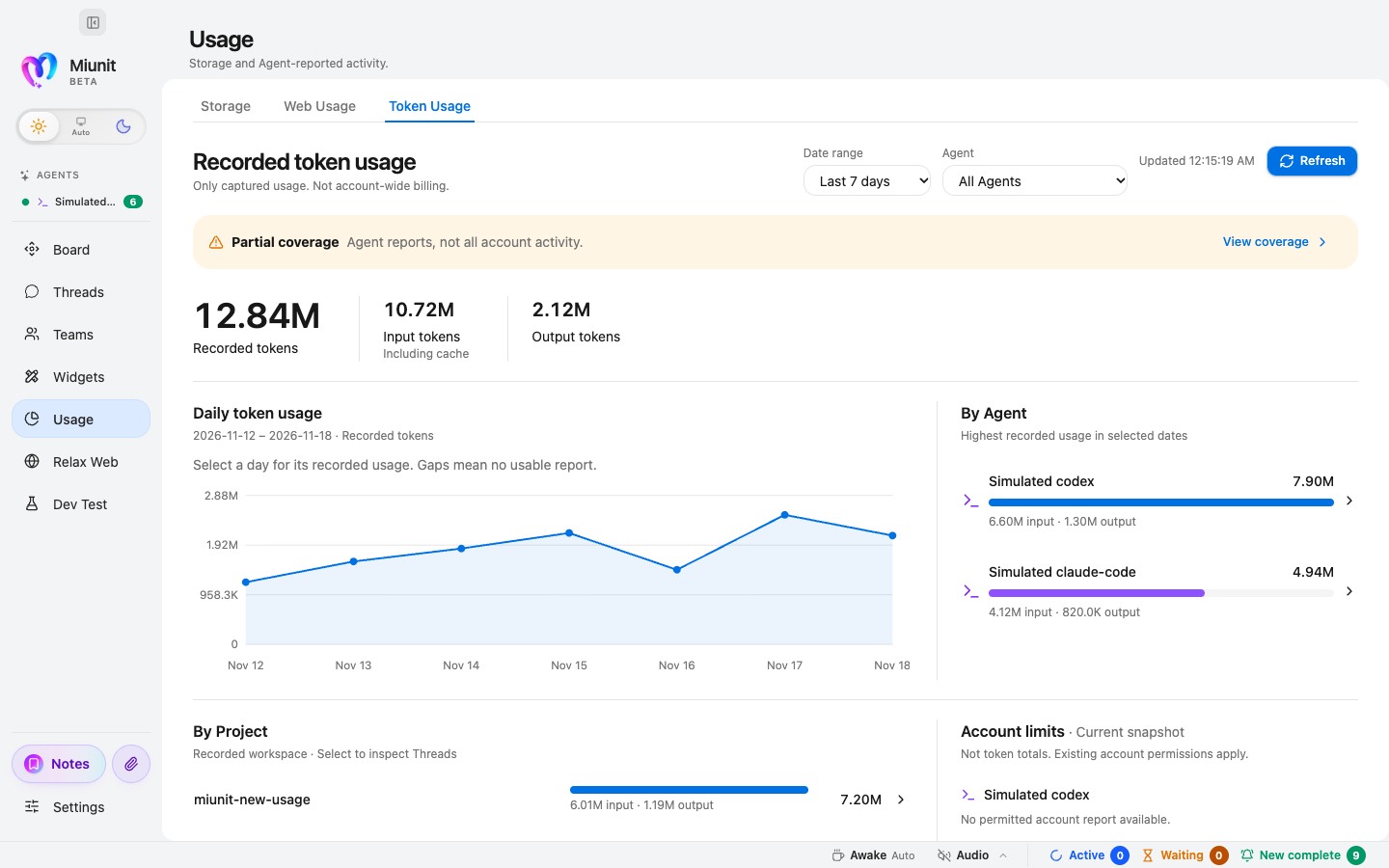
Open Token Usage to see recorded input and output tokens, daily trends, and breakdowns by Agent, project, and turn. Check any excluded-turn or backfill notice before comparing totals. Unavailable records can reduce the reported total.
Token counts, account quotas, and costs are separate. An Agent’s reported account limits can appear in the status bar when supported. The token view does not estimate costs.