 Miunit
 documentation / Daily work
Recap
Ask the Agent that finished a task for a short report. Nothing runs until you press Recap.
Ask for a Recap
Under a finished task in Threads, in its details on Board, or in Completion Review, press ✦ Recap. Miunit asks the task’s own Agent to write the report as one more turn with its default model, so a Recap uses some of that Agent’s quota. While it writes, the task shows Writing recap with a timer and Stop.
The Recap runs in the background and leaves your thread as it is. Codex and Claude Code write it in a copy of the session, which already knows the task. Cursor and Gemini CLI get a new session with the task’s request and final reply. These background sessions stay off Board and Threads, but they can appear in the Agent’s own history.
The Agent is asked only to read: no edits, builds, tests or installs. If it asks a question or for permission anyway, Miunit stops the Recap and shows what it asked.
Read the report
A ready Recap appears under the task as Recap · Agent name, with the time it was written.
- Summary
- A headline and a few key points, with any images and files the task produced. Open one to preview it.
- Next steps
- What to do next, the recommended step first. Use puts a step in the message box without sending it.
- Report
- How complete and certain the Agent considers the work, what it checked, its key decisions and blockers, the code changes, and how long the task took.
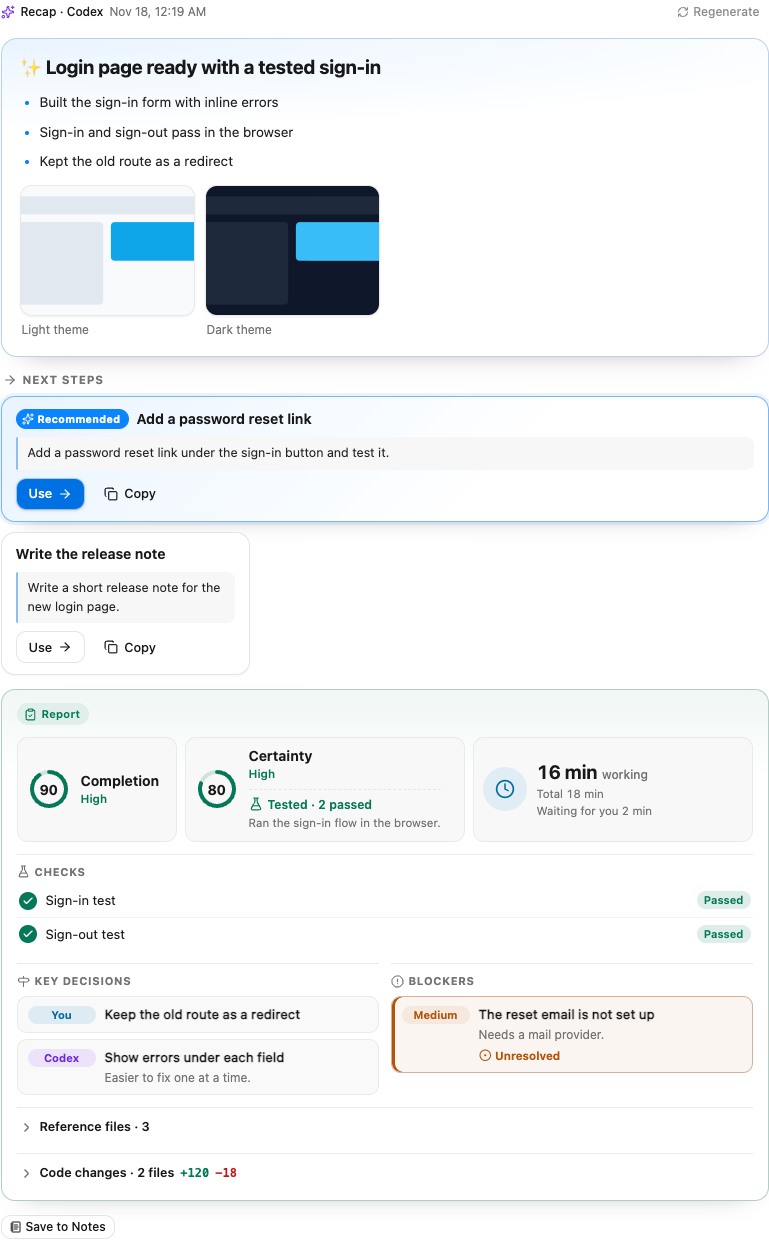
Board keeps the original prompt as the card title and shows the Recap headline in its reply preview. Threads keeps the prompt as the title. Regenerate asks for a new Recap, which is another turn. Save to Notes keeps the report; Use on a step in Notes opens the thread with that step in its message box.
Ask for a Recap and use a next step
Final reply · Updated the empty and error states. Unit checks pass…
A Recap is the Agent’s own account of its work. Use the task status to see whether the Agent finished, and the original reply or recorded activity in Threads to verify a claim before you rely on it.
When Recap is available
Recap is offered for the latest task in a thread after it finishes and anything it left running has ended. The task needs a final reply, and its Agent needs to be connected. Short tasks, such as a one-line question with a brief answer and no changed files, have no Recap. Neither do tasks started by Notes or Teams.
When the button is unavailable, the reason appears beside it. Up to two Recaps run at once and a few more can wait their turn. If a Recap stops or fails, the reason is shown with Try again.
To hide Recap, open Settings → Recap and turn off Show Recap under finished tasks.