 Miunit
Recap
Catch up without reading every turn.
When several agents finish at once, ask for a short report on the task you need: what changed, what was checked, and what to do next.
Try it in Miunit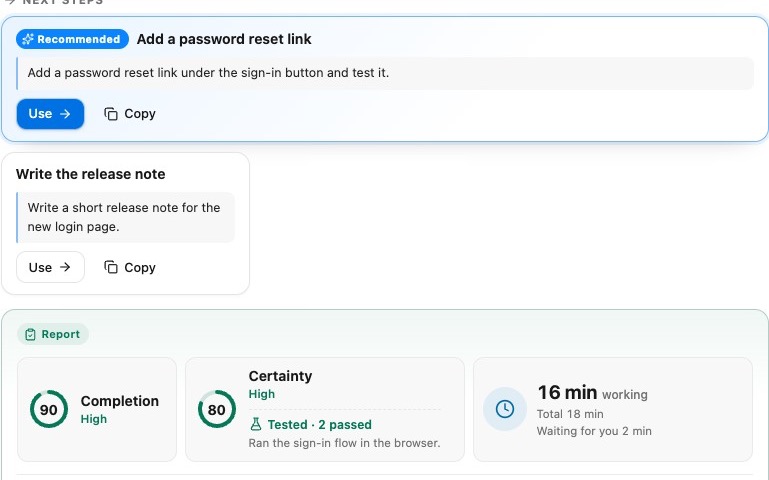
When everything finishes at once
Find the one thing you still need to check.
You come back from lunch to six completed tasks. Five are straightforward. The sixth changed the right file but couldn’t run the browser test. If you read every conversation from the beginning, it takes a while to find that one caveat.
Press Recap under the task you need, and the agent that did the work writes a short report: the main result, what it checked, and what it suggests next. Start there, then open the original reply or recorded activity when a decision depends on it.
Illustrative example
Read the outcome, the checks and the next step.
-
01 · Summary
Sign-in copy updated
Empty and error states now explain what to try next. The browser check is still open.
-
02 · Verification
Unit checks passed
The agent reports that it ran unit checks and that the browser suite was unavailable.
-
03 · Next steps
Run the browser check
Use puts the step in the message box. Nothing is sent until you decide to send it.
On your terms
Nothing runs until you ask.
A Recap is one more turn on the task’s own agent, with its default model, so it uses some of that agent’s quota. Miunit doesn’t summarize tasks in the background or send your work to another service. If you don’t want the button, you can switch Recap off in Settings.
A Recap is a reading aid, written by the agent about its own work. For the sign-in task, use it to find the missing browser check, then go back to the recorded work before you sign off.
Read a result in layers
Go from a short summary to the evidence.
-

Start with the decision you need to make.
If the question is “Can I ship this?”, look for the changed behavior and anything still open. A Recap can put both in front of you. If you only need to know whether the agent finished, use the task status. A clear summary and a completed task are different pieces of information.
-

Follow the source when the stakes go up.
Imagine a Recap mentions that sign-in now handles expired links. The agent’s final reply may describe the expected behavior and say that unit tests passed. Recorded activity can show which files or tools Miunit captured. Open the source you need before signing off. A missing browser test is a useful next task to queue.
-

Ask for a Recap when it saves you time.
A day of small edits doesn’t need a report on every result, and short tasks don’t offer one. Press Recap when you are comparing several finished tasks, returning after a break, or reading a long reply with several caveats. If the button is unavailable, the reason appears beside it.
Miunit Docs