 Miunit
Why Miunit
A calmer way to work with AI agents.
One local workspace to see what’s running, give each job to the right agent, and decide what happens next.
Explore the stories
The idea
Be the person directing the work.
It’s 4:40. One agent is fixing a broken test, another is looking through the release notes, and a third has been waiting for you to choose an approach. You can keep all three windows open and check them every few minutes. Or you can look at one Board and find the decision that needs you.
We built Miunit for that second kind of afternoon. Connect the agents you already work with. Give them a job in the right project. Check on the outcome, answer the questions that need a person, and save the bits you’ll use again next week.
A day in Miunit
More time for the decisions that matter.
Waiting.
Ready.
See the state of the work at a glance.
 Teams in the Internal build
What’s next?
Pick up where the agent left off with a Recap.
 Keep the useful bits
How it fits together
One workspace for the whole job.
-

Start in the right place.
Suppose a release needs a build fix, customer-facing notes, and a final review. Start a task with the agent you want and the folder it should work in. If someone already started a supported conversation elsewhere, bring it into view through external observation. On Board, each thread keeps its status and ownership, so you know whether you can reply in Miunit or need to go back to the agent that started it.
-

Put a person at the decision points.
Check Waiting for work that needs a choice. Ask for a Recap to get the shape of a finished result, then go to Threads for the original reply or recorded activity when the details matter. In the Internal desktop build, give a Teams Planner one outcome and set the roles in advance. You can review the initial plan and pick up the next round in the same discussion.
-

Keep a useful result close.
Once the work is done, save the checklist, prompt, or supported delivery in Notes. Bring a snapshot into a compatible composer when the next job starts. Use Usage when you want to understand the recorded token activity, reported tool calls, or local storage behind a busy week. Those views are there when you need to investigate, and Board is where you come back to decide what to do next.
Explore the stories
Where Miunit fits into your day.
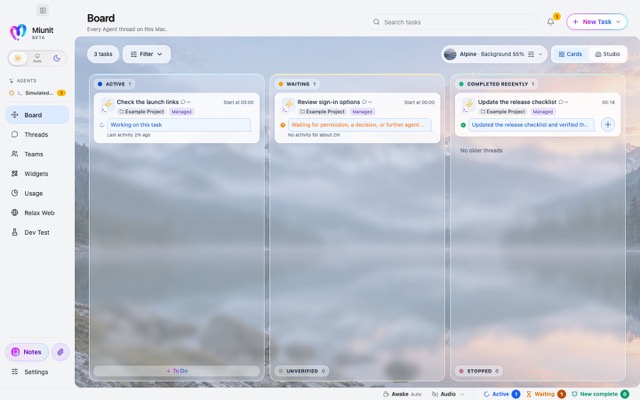
Run the work. Close a few tabs.
Get the state of your work in one glance, then open the conversation that actually needs you.

Give each job to the agent you’d pick for it.
Use the tools you already trust, choose who runs the next task, and carry forward the context that matters.

Give one brief to a team of specialists.
Put a Planner, a builder, and a reviewer on the same outcome. Stay involved where a decision matters.
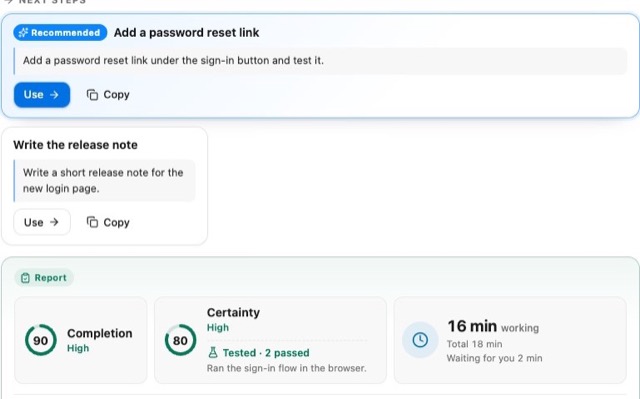
Catch up without reading every turn.
When several agents finish at once, ask for a short report on the task you need: what changed, what was checked, and what to do next.

Know where your work lives.
Keep workspace records on your computer and understand what your chosen agent can send elsewhere.

Save the context you’ll want again.
Turn a good prompt, a useful answer, or a Recap into something the next task can use.

See what the work uses.
Look at token activity, reported web and tool calls, and local storage from the same workspace.
Miunit Docs