 Miunit
 documentation / Daily work
New tasks & forks
Choose whether to start fresh, continue the same conversation, or carry earlier context into a separate thread.
Start a new task
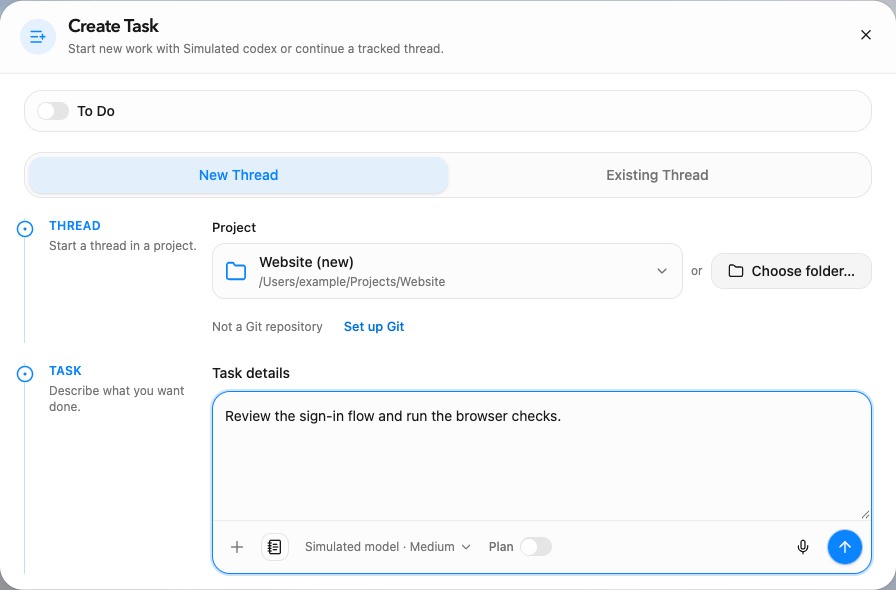
- On Board, open New Task and choose an enabled Agent.
- Keep New Thread selected, choose a project folder, and enter Task details.
- Review the launch options your Agent offers. If the project is a Git repository and the Agent supports it, choose the current folder or start in a new worktree. Submit with the blue arrow, or turn on To Do to queue it.
Continue the same thread
Open a managed thread on Board or in Threads and send the next prompt. In Create Task, you can also choose Existing Thread when the Agent and selected session support it. Use the same thread when your follow-up belongs in the original conversation.
Continue in a copy
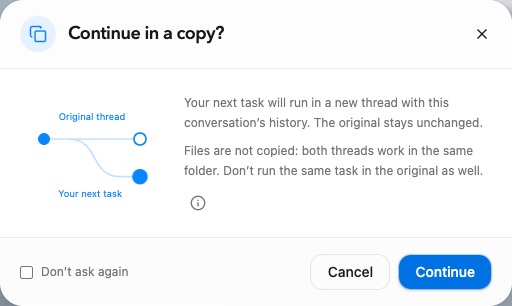
Choose Continue in a copy when the option is available on the source thread. Read the confirmation, then write and send your follow-up in the copy composer. Miunit creates a separate thread with the earlier conversation as context. The original thread keeps its own history and the new work has a separate place to continue. Both threads still use the same project folder, so avoid running the same change in both.
Fork a thread without adding to its history
Agent: The email flow passes the existing checks.
When the copy action is unavailable
Forking depends on the Agent and the source session. If Start from this conversation is offered instead, it starts a new session with the recorded conversation as background. If neither action is available, start a new thread and include the context you need.