 Miunit
 documentation / Workspace controls
Sounds & Keep Awake
Choose when Miunit plays task sounds and when it asks your computer to stay awake.
Choose task sounds
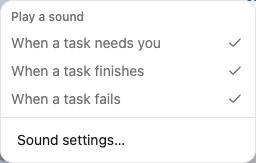
Use Audio in the status bar to switch sounds on or off. Open its options to choose whether a sound plays when a task needs you, finishes, or fails. For sound choices and previews, open Sound settings.
Choose a Keep Awake mode
- Off
- Let the computer sleep according to its normal settings.
- While agents work
- Keep the computer awake while Miunit detects active Agent work. Waiting for your answer or an unverified state alone does not keep it awake.
- Always
- Ask the system to stay awake while Miunit is open.
Interactive example
Try status-bar preferences
Keep Awake · Normal system sleep policy applies.
Audio · Muted.
Understand what stays awake
Keep Awake targets automatic idle sleep. The display can still turn off and the session can still lock. Closing a laptop lid, manually choosing Sleep, or losing power can interrupt the work.
For temporary clipboard items, use Clips in the sidebar.